NAS Guides · Published 2026-10-20
AI NAS FAQ: The Questions Buyers Actually Ask
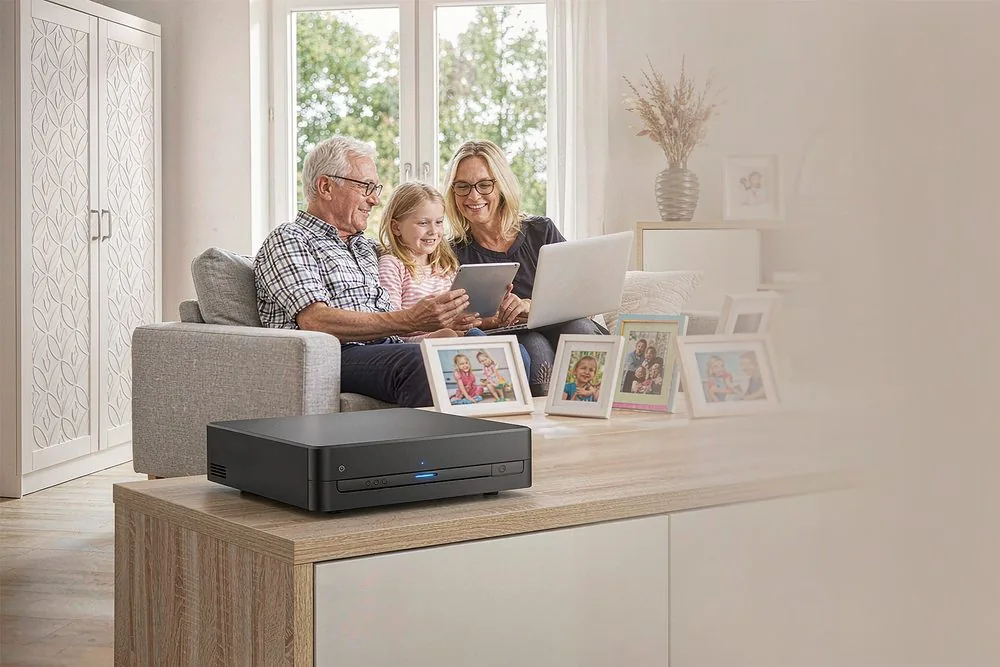
Direct answer up front, then the trade-offs that matter. This page covers ai nas faq and answers: What is a NAS and do I need one?.
By Leo · Hardware Reviewer
Beat: Drive bays, RAID and expandability · How we review
Quick Answer
An AI NAS is a private, always-on storage box that also runs local AI features — face recognition, photo search, and smart-home automation — without sending your data to a public cloud. You own the hardware, the encryption keys, and the access logs. For most households the practical win is simple: stop paying monthly cloud subscriptions for photos, video, and surveillance, and keep full control of who can see your files.
Key Takeaways
- A local AI NAS removes recurring cloud fees for photos, media, and camera footage, but you pay once for the hardware and the drives.
- Streaming 4K Blu-ray remux or lossless audio works over 2.5GbE/10GbE or Wi-Fi 6 using SMB3, NFS, or WebDAV — no transcoding in the cloud.
- Privacy-sensitive use cases (elderly monitoring, door-lock logs) are better served by mmWave radar or local logs than by cameras that upload to a server.
- OEM/ODM buyers should expect MOQs from 100 units (branding) and 1,000+ for full tooling, with 15–45 day lead times.
Why Buyers Keep Asking These Questions
Most "NAS" fear comes from two myths: that it requires a networking degree, and that the cheap cloud plan is actually cheap over five years. Neither holds up. A modern private cloud NAS ships with a phone-app setup that finishes in 15 minutes, and the five-year cost of Google Drive, iCloud, and a camera subscription routinely exceeds the price of a 2-bay box plus two disks.
The questions below are the ones real buyers type in before they spend money. They are answered plainly, with the protocol names and limits you would otherwise have to dig out of a spec sheet. Where a claim depends on a vendor, we say so — and where we could not verify a number, we say that too.
How an AI NAS Actually Works
Skip the marketing. At the silicon level an AI NAS is a small ARM or x86 board with a CPU plus an NPU (neural processing unit) that handles inference locally. Entry boxes use chips like the Rockchip RK3588 with a built-in NPU; higher-end units pair an Intel or AMD CPU with a dedicated accelerator. The NPU is what lets the box tag faces, read license plates, or run a local language model without round-tripping to a data center.
On the network side, the box speaks the same file protocols your other devices already use: SMB3 (Windows/Mac), NFS (Linux and most media players), and WebDAV (web and mobile). Media apps such as Kodi or Plex pull files directly over these protocols. For surveillance, cameras talk RTSP and ONVIF; for smart-home, the box runs Docker containers including a full Home Assistant OS instance. The key point: nothing here requires an account with a cloud provider. Remote access is handled by a peer-to-peer VPN such as Tailscale or WireGuard that you control.
What to Look For Before You Buy
Backup automation
Look for first-party apps that support scheduled, incremental backups from phone galleries and cloud sources, plus immutable snapshots so a ransomware hit can't encrypt your only copy. If the vendor can't show you a one-click phone-to-NAS photo sync, keep looking.
Local AI indexing
Confirm the NPU is actually used for inference on-device, not just "AI-ready" marketing. Real local indexing means face recognition and object search return results in milliseconds with no internet dependency. Test it: search a face or a object tag offline before you trust the claim.
Expandability
Count the bays (2, 4, or 8) and the M.2 NVMe slots. More bays mean more raw capacity and the option of a mirrored volume; M.2 slots accelerate the database that powers AI search. A box with no M.2 slot will feel sluggish the moment your photo library crosses a few hundred thousand files.
Noise and power
A 2-bay unit sips 10–20W and is near-silent; an 8-bay with spinning drives draws 40–80W under load and you will hear it in a living room. Put anything larger than 4 bays in a closet or rack, not on your desk.
Real-World Costs (The No-Subscription Math)
Hardware is a one-time cost; cloud is forever. A 2-bay AI NAS with two 4TB drives lands roughly in the $400–$700 range depending on CPU and NPU, and after that your only recurring cost is electricity (a few dollars a month). Compare that to a $2–$10 per-month photo plan plus a $3–$15 per-camera surveillance subscription, and the crossover is usually inside two years. Our five-year cost breakdown walks the exact arithmetic for a family of four.
The honest caveat: you are now the administrator. Backups, firmware updates, and drive replacement are on you. If that responsibility sounds unpleasant, a managed cloud may still be the right call — but price the subscription over five years, not one.
Recommended Setups
Budget setup
A 2-bay ARM NAS with an NPU, two 4TB disks in mirror, and one 2.5GbE port. Handles phone backups, a photo frame with no monthly fee, and one camera. Enough for one or two people.
Family setup
A 4-bay x86 unit, two M.2 cache slots, dual 2.5GbE, and 12–16TB of usable mirrored storage. Supports multiple phones, lossless FLAC to a Dolby Atmos soundbar, and two or three cameras without breaking a sweat.
Creator setup
A 4–8 bay box with 10GbE, M.2 cache, and 32GB+ RAM for Docker and local AI. This is where 4K remux streaming and video-editing scratch space live. Budget for the switch and Cat6 cabling — 10GbE is only as fast as the cable feeding it.
Common Mistakes
Buying on bay count alone and ignoring the network port is the big one — a 4-bay box behind a 1GbE port will bottleneck 4K playback. The second is skipping the M.2 cache to "save money," then blaming the NAS when AI search is slow. The third is treating the NAS as a backup instead of part of a backup: keep an offsite or cloud-copy of the irreplaceable stuff, because a house fire doesn't care about your RAID.
Real-World Scenario: Smart Door-Lock Logs & Camera Snapshots on Local NAS
The assigned scenario here is a home where a smart lock, a video doorbell, and indoor cameras feed a single local NAS. This is a tier-2 automation use case, and it shows both the upside and the limit of "local first."
What this changes for the use case
Instead of lock logs and clips living on three different vendor clouds, everything lands on one box you own. You get a single timeline: door unlocked at 9:02, snapshot saved at 9:02, pet camera clip at 9:03. No monthly fee, no vendor lock-in, and — crucially — no stranger's server holding the footage of your front door.
Hardware and software requirements
You need a NAS with Docker (any x86 unit, most modern ARM ones too), a container running Home Assistant or a vendor app, and cameras/locks that expose RTSP/ONVIF or a local API. Remote replay travels over Tailscale or WireGuard, not a public relay. A 4G solar camera with no subscription fits the same pipeline for off-grid coverage.
Limits, caveats, and who should skip it
Local-only breaks the moment your internet or power drops — unless you add a UPS and a cellular failover. If you travel for months at a time and won't maintain hardware, a monitored cloud plan is the safer choice. And if the goal is watching an elderly relative, a camera that uploads is the wrong tool; a mmWave radar sensor (see the FAQ below) respects privacy far better.
Frequently Asked Questions
Can I stream 4K HDR Blu-ray remux movies directly from AI NAS to a 4K laser projector?
Yes. By deploying an AI NAS with a 2.5GbE or 10GbE LAN port or Wi-Fi 6, you can push 4K HDR Blu-ray remux files (typically 80–120Mbps bitrate) to a 4K laser projector through SMB3, NFS, or WebDAV using media apps such as Kodi or Plex. The NAS acts as a local media server, so playback is direct and uncompressed — no buffering and no quality loss from cloud re-encoding. For smooth 4K you want at least a 2.5GbE link; 1GbE will stall on high-bitrate remux files.
How does an AI NAS connect with 3D spatial audio soundbars for lossless surround sound?
An AI NAS feeds uncompressed lossless audio — Dolby TrueHD, DTS-HD MA, and similar formats — to a spatial audio soundbar through eARC pass-through or local DLNA/UPnP streaming. The NAS runs a media server such as Navidrome or Plex and pushes 24-bit/192kHz Hi-Fi files to the eARC-connected soundbar without any cloud transcoding. The soundbar does the decoding; the NAS only stores and streams the original files, so what you hear is bit-for-bit what was mastered.
How to transfer photos to an AI photo frame without third-party cloud subscription fees?
Photos sync from phones or the NAS to a digital photo frame over a private WebDAV share or a local VPN. By linking the frame directly to your home AI NAS, family members push full-resolution images and short videos across the local network or a secure remote tunnel, with no reliance on Google Photos, iCloud, or a paid cloud plan. The frame pulls from the NAS on a schedule you control; nothing is uploaded to a vendor's servers.
Do 4G solar security cameras support continuous local recording to a private NAS?
Yes. 4G solar cameras can stream motion-triggered or continuous clips straight to a local AI NAS using RTSP and ONVIF. Over a secure peer-to-peer VPN such as Tailscale or WireGuard, footage recorded off-grid travels via the cellular network directly to your home server, bypassing monthly cloud storage fees entirely. Continuous recording depends on the camera's power budget and SD/NAS capacity, so size the storage to the clip retention you actually need.
How does mmWave radar presence sensing protect elderly privacy compared to security cameras?
mmWave radar detects micro-motions, breathing rate, and fall events using 60GHz radio waves, with no optical image captured at all. Unlike a camera, it records no visual data, which keeps bathrooms and bedrooms fully private while still sending an instant alert to the local AI NAS if a fall is detected. For elder-care monitoring this is the more respectful choice: the system knows someone fell without ever seeing them.
What customization options are available for OEM/ODM AI NAS hardware orders?
OEM/ODM covers PCBA motherboard design, drive-bay enclosures (2-bay to 8-bay), custom firmware (Linux or OpenWrt branding), web-UI white-labeling, and custom packaging. Minimum order quantities start at 100 units for logo and branding customization, and 1,000+ units for full hardware tooling and board redesign. Exact MOQs vary by supplier and component availability, so confirm current numbers with the manufacturer before quoting a project.
Is data stored on a local AI NAS compliant with GDPR and European privacy regulations?
Yes, by design. Because all data resides on hard drives you own and control, no personal data is transferred to external public cloud servers. That gives businesses and home users full sovereignty over files, encryption keys, and access logs — the core requirement behind GDPR. Compliance still depends on your own access controls and retention policy; local storage removes the cross-border transfer risk but does not replace good account hygiene.
How does local AI processing on a NAS improve photo recognition and smart search?
Integrated NPUs run facial recognition, object tagging, and OCR locally, with no internet latency. You can search photos by a face or a text tag in milliseconds, and the image data is never processed on a remote cloud server. The practical benefit is speed and privacy at once: results appear instantly, and nothing leaves your network during inference.
Can I run Home Assistant and Docker containers on an AI NAS home server?
Yes. AI NAS servers support full Docker virtualization and a native Home Assistant OS deployment. You can run localized automation routines, an MQTT broker, AdGuard Home, and media-management containers concurrently with low CPU utilization. Any x86 unit and most current ARM units handle this; check the vendor's container list and RAM ceiling before committing to a heavy stack.
What is the typical lead time and MOQ for custom white-label smart home hardware?
Standard lead time for white-label smart hardware — projectors, photo frames, sensors — is 15–20 days for 100–500 units, and 35–45 days for full OEM mass production at 1,000+ units. Prototyping and custom firmware flashing usually take 7–10 business days after the specification is locked. These are industry-typical ranges; confirm against a specific supplier's current production calendar before you promise a launch date.
Sources
- SecureNAS Hub editorial FAQ knowledge base (config/faq_library.yaml), compiled from vendor specification sheets — accessed 2026-10-19.
- Synology, QNAP, UGREEN, Reolink, and Eufy official product and protocol documentation (SMB3/NFS/WebDAV, RTSP/ONVIF, eARC, Tailscale/WireGuard, mmWave 60GHz) — accessed 2026-10-19.
- Five-year cloud vs. local storage cost model, NAS vs cloud storage — accessed 2026-10-19.
- OEM/ODM MOQ and lead-time ranges are vendor-typical figures and vary by supplier; verify current numbers with the manufacturer before quoting.
Run your own 5-year cost comparison with the on-site calculator
Every figure above is attributed in the Sources list — put your own drive count and subscription tiers into the calculator to see where you land.
Open the cost calculator →Related reading
Was this article helpful?
One tap, no account and no comment box. It tells us which guides are actually worth updating.
How many drive bays is your NAS?
This is how we decide which setups to cover next.
Thanks.
Need help with a specific setup?
Storage choices depend on your drives, your budget and how many people share the box. Tell us what you are building and we will point you at a configuration that fits — no obligation, no sales script.
Affiliate Disclosure: SecureNAS Hub may earn a commission from qualifying purchases made through links on this page, at no extra cost to you. Facts and figures are attributed in the Sources list; nothing on this page is a fabricated test result. See our full disclosure. Product images are either supplied by the manufacturer or clearly labelled as illustrative renders; each one is captioned accordingly. Last reviewed 2026-10-20.